PROJEKTRA
Analyze. Visualize. Report.
Independent project auditing and technical reporting for professional DAW sessions.
A unified system for searching, organizing, and understanding your projects.
Semantic search, custom tagging, and high-fidelity reports – all in one workflow.
Workflow Infrastructure
Comprehensive Asset Inventory
Identify VST2/VST3/CLAP dependencies and native modules across (at the moment).rpp, rpp-bak, als, .song, .dawproject.* Automatically cross-reference projects against your local plugin database to isolate missing instruments, effects, and media assets before you launch the DAW.
Timeline Reconstruction
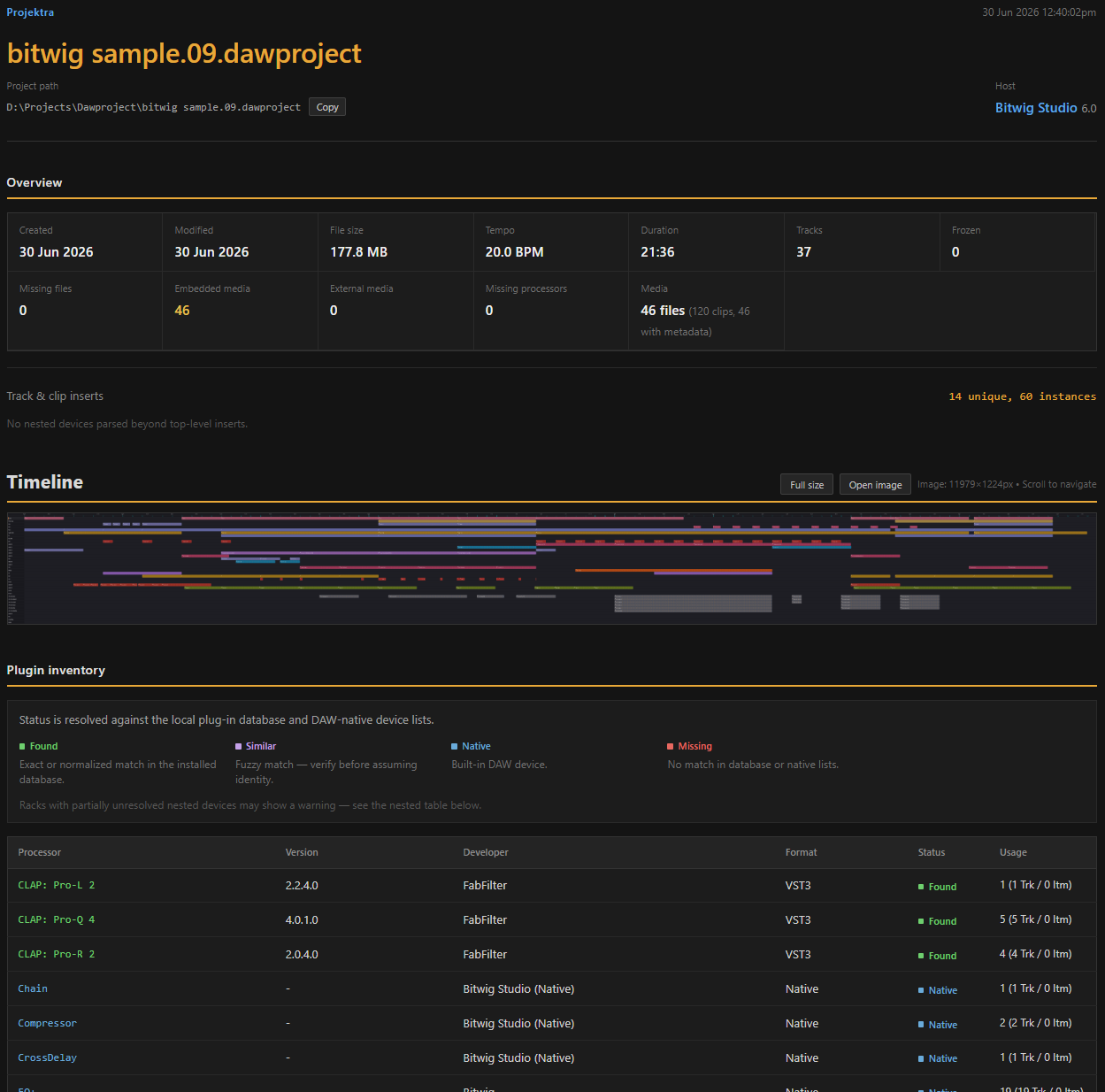
Visualize arrangements, track hierarchies, and clip positions on an interactive timeline. Assess session density and track structure without DAW memory overhead. Live search highlighting enables instantaneous visual localization of specific plugins, tracks, or clips directly within the arrangement view.
Global Metadata Indexing
Execute surgical searches by BPM, duration, and plugin chains (including Item FX) with support for logical operators and nested conditions. Streamline your library through tag management, batch operations, and detailed HTML reporting featuring timeline captures and full asset specifications.

Multi-Tier Recursive Search Engine
High-Fidelity AST Query Evaluation
Projektra’s search core is built on a custom Abstract Syntax Tree (AST) engine, moving beyond simple string matching into true semantic data retrieval. It performs a deep, recursive scan through every project tier: from global master channel strips and track-level inserts down to individual clip effects and nested Item FX hierarchies. By combining surgical field prefixes (plugin:, track:, bpm:, duration:) with boolean logic and nested parentheses, you can isolate specific production techniques or instrument combinations across your entire library.
Full-Spectrum Plugin Inventory & Rack Recursion
Forensic Reconstruction of Your Signal Chains
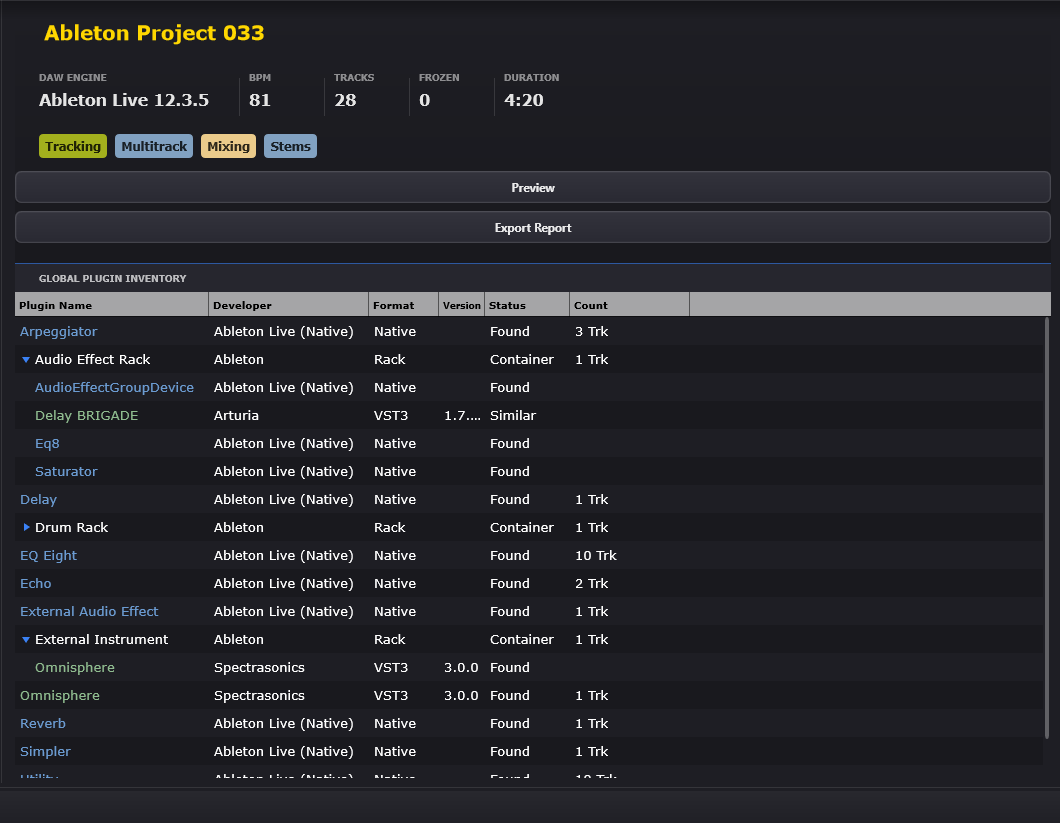
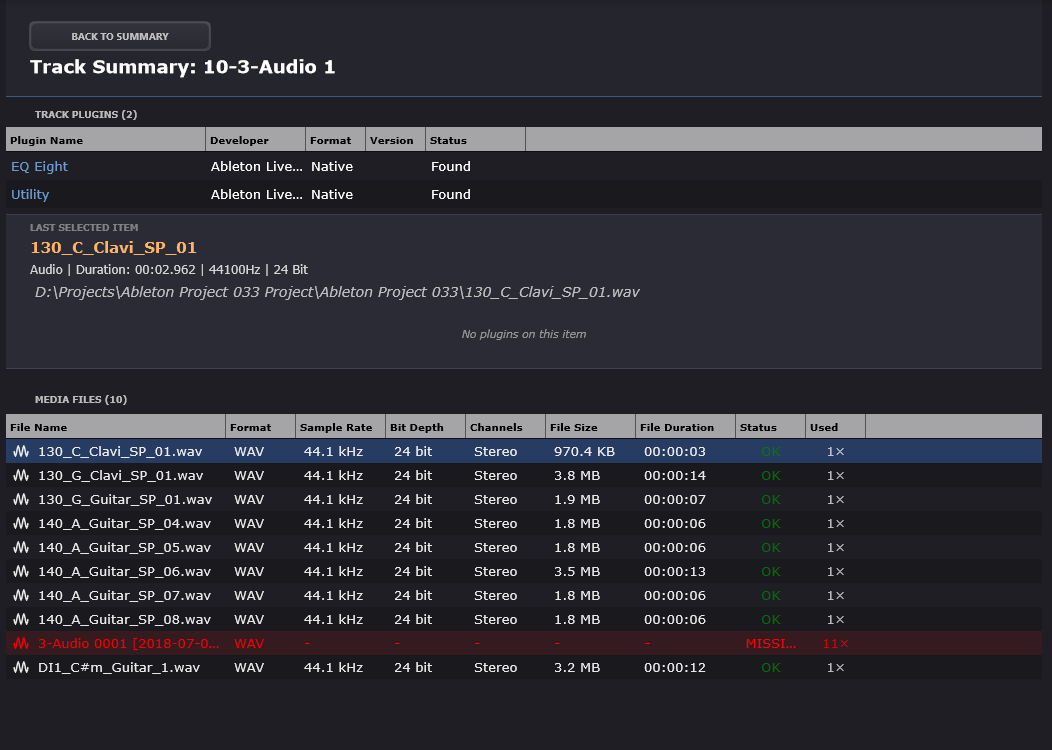
Projektra executes a forensic analysis of your project’s processing architecture, identifying VST2, VST3, and CLAP dependencies alongside platform-specific native modules.
Strategic Interoperability: While delivering granular depth for native formats like .als and .rpp, Projektra provides structural support for cross-DAW standards like .dawproject, ensuring a balanced overview of your entire ecosystem.
Rack Navigation: Uncover the internal structure of plugin racks and containers, exposing nested instruments and effects hidden in standard browsers.
DAW-Specific Meta-Data: Full support for Reaper JS effects, Ableton AMXD (Max for Live), and native internal devices with status mapping (Found, Missing, Native).

Interactive TrackView & Live Search Highlighting
Precision Navigation Through Project Topography
Visualize the interior architecture of your sessions without the latency or memory overhead of a DAW. Projektra’s TrackView module performs a high-fidelity reconstruction of your project’s timeline, supporting both Arrangement and Session hierarchies across all supported formats.
- Real-Time Visual Localization: As you type your search query, the AST engine instantly highlights matching instruments, clips, or tracks directly within the timeline. See exactly where a specific plugin is used or where a MIDI clip resides in the arrangement.
- Structural Auditing: Navigate complex track hierarchies, folder structures, and clip arrangements with seamless zoom and scroll. Identify session density and signal chain logic at a glance.
Custom Metadata Taxonomy & Semantic Tagging
The Unified Classification Layer for Your Studio
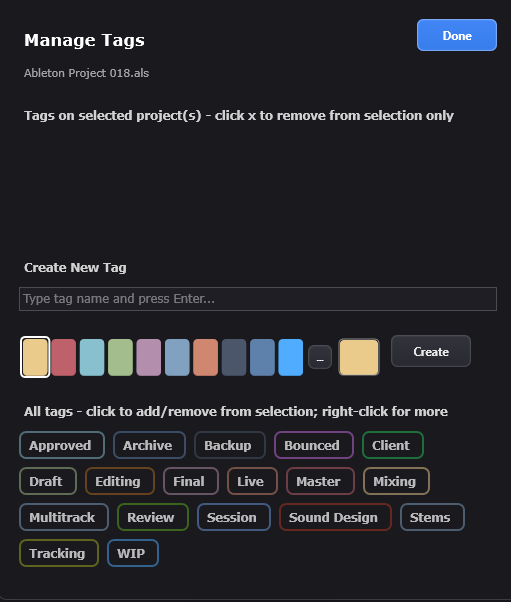
Bridge the gap between disparate DAW formats with a persistent, non-destructive tagging system. Projektra allows you to augment your session files with a custom metadata layer that lives outside the project binary, ensuring your original data remains untouched.
- Visual Organization: Deploy color-coded identifiers to categorize projects by client, production stage, or sonic character.
- Search Integration: Use the
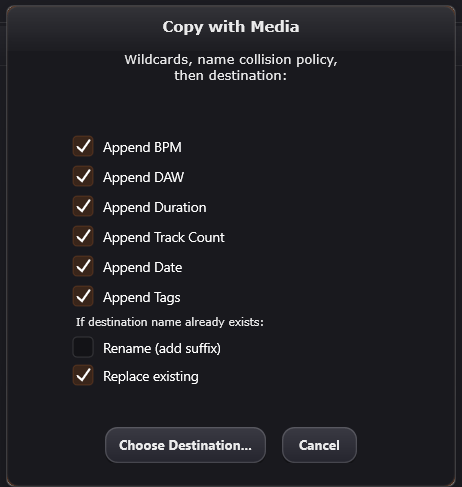
tag:prefix within the AST engine to combine custom labels with technical parameters like BPM or specific plugin chains. - Workflow Automation: Tags act as dynamic variables in the batch-copy engine, allowing you to automate folder hierarchy and file renaming based on your personal taxonomy.
Transform a chaotic directory of files into a structured, searchable, and intelligent production ecosystem.
Metadata-Driven Automation & Deployment
Intelligent Asset Orchestration
Transform search results into action through a robust batch-processing engine. Utilize dynamic wildcards—including your custom tags, BPM, and DAW type—to automate file renaming and directory organization. The Media-Aware Export module allows you to consolidate sessions into isolated, portable folders, ensuring that every referenced asset is collected and structured for seamless migration or delivery.
After batch copy operation, the app generates a detailed report in the destination folder (_copy_report_YYYYMMDD_HHMMSS.html) and shows a summary dialog.
Standalone Technical Manifests
Deterministic Archival & Reporting
Projektra introduces a professional standard for session documentation. The generated HTML reports are fully encapsulated, self-contained artifacts: all CSS, logic, and visual timeline snapshots are embedded into a single file. This creates a permanent, DAW-independent technical passport of your work. Your project’s structure, plugin inventory, and media requirements remain readable and reproducible in any browser.
Currently, compatible with:

Reaper

Ableton Live

Bitwig Studio

Studio One
Key questions
What is Projektra?
Projektra is an automated DAW project scanning and reporting tool. It parses your DAW project files directly, visualizes track and timeline structure, and generates detailed HTML reports. It also cross-references referenced plugins against your local plugin database.
Which DAW formats are supported?
Projektra supports Ableton Live (.als), Reaper (.rpp and .rpp-bak), Studio One (.song), and Bitwig (.dawproject, plus applicable XML variants where relevant). Due to some .dawproject limitations, we have disabled the ability to play audio items and display nested devices in rack plugins.
Do I need the DAW installed to scan projects?
No. Projektra reads project structures directly from project files, so you can scan and generate reports without launching the DAW.
How does plugin detection work?
Projektra scans projects and matches referenced plugins against its plugin database built from your configured VST plugin paths. Plugins are classified as Found, Missing, Native, Unused, or Some Missing for composite rack-like devices.
Why do some plugins show as Missing even if I have them installed?
Usually this happens because your plugin database is outdated or your VST scan paths are not pointing to the correct locations. Run a Full Rescan in Settings, confirm the VST paths, and then refresh the project folder. Name differences between formats can also contribute.
What does Native mean?
Native means the plugin or device is built into the DAW environment (for example, Reaper JSFX or Ableton native devices). Native items are treated as not missing.
How does caching work, and why is Refresh faster than Scan?
Projektra uses smart caching to avoid re-parsing unchanged projects. It fingerprints files using file path, last modified time, and file size. Refresh tries to reuse cached metadata, while Scan performs a full re-parse for the selected folder.
How do I search across many projects?
The Scanner and search UI support field filters, range queries, and logical operators. Examples: plugin:FabFilter, track:Bass, clip:Intro, tag:Draft, bpm:120-130, and duration:3:00-5:00. You can also combine conditions with AND, OR, NOT and parentheses.
How do I generate an HTML report?
Open a project in Projektra, then click Export Report from the project details area. Choose which sections to include (dashboard metrics, visual timeline, global plugin inventory, project structure and assets, item event FX, and media files summary). The output is a single self-contained HTML file.
What is inside the report, and how do expandable parts work?
The report contains structured tables for plugin inventory and project structure. Hierarchical elements such as rack-like nested devices and per-asset path lists are shown with collapsible sections so large projects remain readable. Missing items are highlighted to help you spot issues quickly.
What happens if I change hardware or system time?
The license is bound to your computer hardware. Large hardware changes may require deactivation and re-activation. The system clock also matters for security checks; significant discrepancies may trigger protective behavior.
How do I deactivate my license or stop the trial?
Open the main menu (Hamburger icon) and select Deactivate License for full licenses or Stop Trial/Deactivate for trials. You must confirm in the dialog, and an internet connection is required to release the license or trial on the server. If server deactivation fails, the app may offer Force Remove, which removes only the local license file and does not free the server slot. Alternatively, you can deactivate your license from your personal account, which is linked to your email address when you purchase Projektra.
Structure the chaos. Find instantly. PROJEKTRA.